integration • Microsoft dynamics 365 Business Central

WMS for Business Central - for growing warehouses

Bitlog extends Business Central with a warehouse system that speeds up picking, automates the manual work, and keeps your stock accurate with a deep BC-ecosystem fit. Your ERP stays the system of record; Bitlog takes care of the warehouse floor.
  • check_circle
    Prioritizes orders around your cut-offs, automatically
  • check_circle
    Faster picking, higher accuracy, tighter cost control
  • check_circle
    Cloud-native, reachable from anywhere
Nordic-Nest-11

Does Bitlog WMS replace Business Central?

No. Business Central stays your system of record for orders, inventory, and finance. Bitlog WMS is the warehouse layer on top: it speeds up picking, automates replenishment and shipping, and syncs the results back to BC automatically. 

The connector installs from Microsoft AppSource and runs inside Business Central, so there's no middleware to maintain, and no ERP to replace.
Tammer-Brands_Warehouse-6

How it works

It only takes four steps from Business Central to a warehouse that ships faster.

1

Install from AppSource

Add the Bitlog connector to Business Central from Microsoft AppSource. No middleware, no separate server to run.

2

Your BC data flows in

Sales orders, purchase orders, items, and customers sync automatically from Business Central into Bitlog.

3

Bitlog organizes the picking

Autopilot prioritizes orders around your cut-offs, batches and routes the work, and guides the team on mobile and through your automation.

4

Results sync back to BC

Shipment confirmations, receipts, and stock adjustments flow back into Business Central, so your ERP always matches the floor.

Bitlog keeps picking when Business Central doesn't

Your warehouse can't stop because the ERP is busy.

Bitlog runs independently during picking: if Business Central is slow, locked, or briefly down, your team keeps working and every transaction is queued and synced the moment BC is back.

No stalled floor, no lost confirmations.

Apohem-Video-Featured_Image

Why run Bitlog WMS with Business Central

A warehouse module records transactions. A mobile scanning add-on confirms them. Neither one organizes the day's work. That's the gap Bitlog fills: it speeds up the work and takes the manual steps out, instead of just recording what happened.

What it does
BC connector Bitlog WMS
BC warehouse module
Mobile scanning add-on
Prioritizes orders around cut-offs
check_circle
cancel
cancel
Optimizes picking routes and batches orders
check_circle
remove
remove
Coordinates manual zones and automation (AutoStore, relay picking)
check_circle
cancel
cancel
Re-optimizes stock and reservations continuously
check_circle
cancel
cancel
Keeps Business Central as the system of record
check_circle
check_circle
check_circle
BC connector
Bitlog WMS
  • Prioritizes orders around cut-offs -
  • Optimizes picking routes and batches orders check_circle
  • Coordinates manual zones and automation (AutoStore, relay picking) cancel
  • Re-optimizes stock and reservations continuously cancel
  • Keeps Business Central as the system of record null
BC warehouse module
  • Prioritizes orders around cut-offs -
  • Optimizes picking routes and batches orders check_circle
  • Coordinates manual zones and automation (AutoStore, relay picking) cancel
  • Re-optimizes stock and reservations continuously cancel
  • Keeps Business Central as the system of record null
Mobile scanning add-on
  • Prioritizes orders around cut-offs -
  • Optimizes picking routes and batches orders check_circle
  • Coordinates manual zones and automation (AutoStore, relay picking) cancel
  • Re-optimizes stock and reservations continuously cancel
  • Keeps Business Central as the system of record null

A cloud WMS your team actually likes using

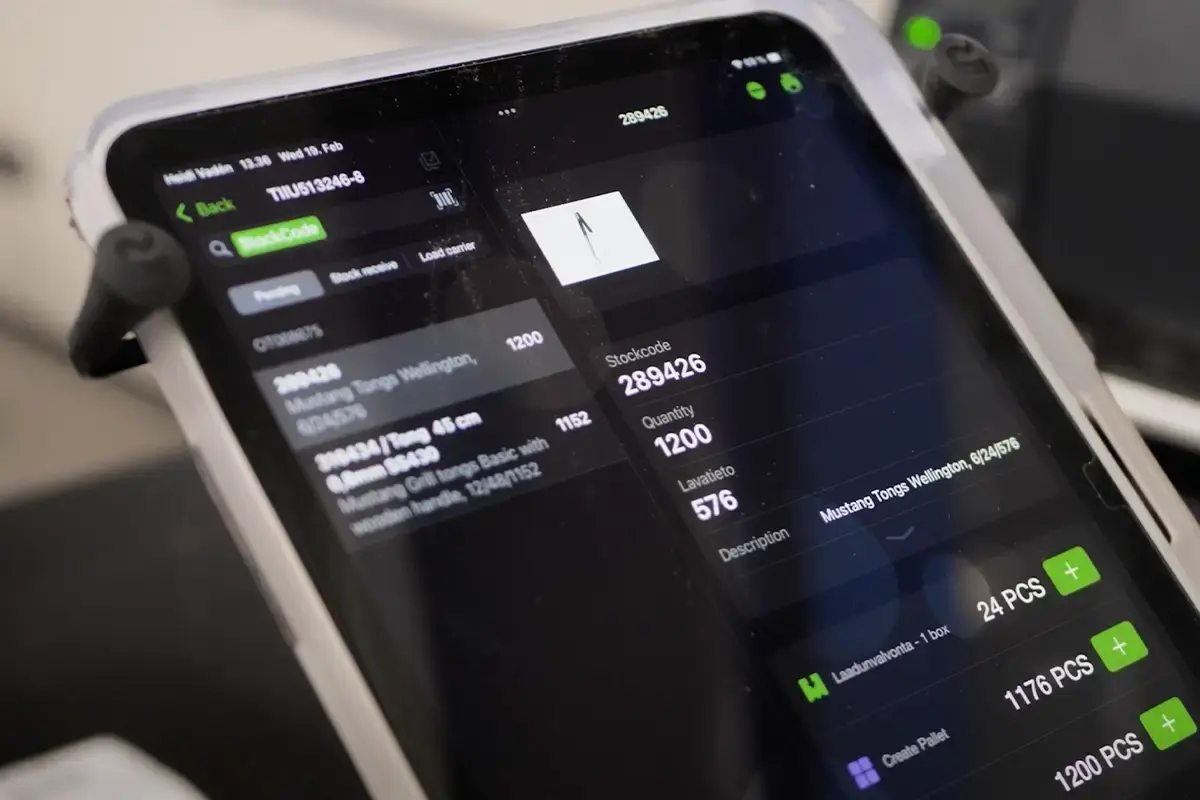
Customers tell us the same thing: the Bitlog WMS mobile app and web portal are easy to live with. The software is automatically upgraded, same release for every customer, so new features arrive without an IT project.

And a new picker is productive after a 15-minute introduction: "With Bitlog WMS, it's very easy for HQ employees to help out picking orders when needed."
- Adam Söderkvist, Warehouse Manager, Care of Carl

Nordic-Nest-07

Put manual processes on Autopilot

Autopilot is Bitlog's optimization engine. Deterministic, always on, and built on years of warehouse know-how. It takes the repetitive coordination off your team's plate.

The result: more orders shipped on time, cleaner backorder handling, lower freight costs, and a team spending its hours on the floor instead of in spreadsheets.

Here are four things the Autopilot handles automatically.

Parcello having a shiny warehouse
low_priority

Real-time Sync

Sorts orders by cut-off, delivery group, urgency, and pickup time, so the team always knows what to pick next.

trolley

Batches and routes picking

Groups orders into efficient rounds and finds the shortest path, cutting up to 30% off walking distance.

local_shipping

Consolidates shipments

Combines orders heading to the same address, so you send fewer packages and pay less freight.

autorenew

Keeps the plan current

Re-optimizes the whole open-order backlog every few minutes, adapting as orders, stock, and cut-offs change.

Stock in the right place

Bitlog reserves stock by matching incoming deliveries against future orders, so inventory frees up and priority customers get their orders without you holding excess to be safe. Its movement tasks then automate replenishment from buffer to picking, based on real-time data and the orders already waiting, so stock is where it needs to be before it runs short.

"Before, someone had to walk the warehouse to check what needed restocking. That could take two days. Now we get suggestions and can restock in 30 minutes."
- Mathias Gårdlund, Supply Chain Manager, Guideline

Tammer-Brands_Warehouse-7

Traceability and shipping, handled at confirmation

Track LOT numbers, serial numbers, and best-before dates through picking and shipping, and write them back to Business Central, so your records stay audit-ready. When an order is confirmed, Bitlog also produces the freight labels and shipping documents through your existing TA and TMS systems.

apohem-box

Real-time order status your customers can see

Bitlog gives every sales order a live delivery status, so your customer service team always has the answer, and you can surface the same status on your e-commerce site for customers to check themselves.

Statuses include:

  • pause_circle
    Waiting to be picked
  • play_circle
    Picking in progress
  • check_circle_unread
    Picked and ready for shipment
  • stop_circle
    Reserved
morgenlevering-3
Customer stories

Warehouses like yours, already running on Bitlog

format_quote
With Bitlog WMS, we've boosted efficiency by 40% and cut our staffing costs by 25%.
Magnus Olsson
Magnus Olsson Head of Logistics, Care of Carl
format_quote
It's incredibly easy for us to train new colleagues and get them operational, which is crucial for our seasonal business.
Hampus Bergdahl
Hampus Bergdahl Data Engineer, Nordic Nest
format_quote
When we started working with Bitlog WMS, we set a goal of 100 order lines picked per hour within a year. We achieved that in four months.
Anette Mühlbach
Anette Mühlbach Chief Supply Chain Officer, Apohem
format_quote
Bitlog is a system that is incredibly easy to use. I haven't encountered any other system that is as simple to manage and as user-friendly as Bitlog.
Nicklas Axell
Nicklas Axell Logistics Director, Hultafors Group

Get more out of the Business Central you already run

See Bitlog WMS on your Business Central setup, from order sync to shipping, in a live demo built around how you work.