

Bitlog WMS Autopilot

Every order planned around your cut-offs, and re-planned every few minutes

Most warehouses still set the day's priorities by hand, then react all afternoon. Autopilot, the warehouse planning software inside Bitlog WMS, plans every order around your carrier cut-offs, routes the work, and re-plans the whole backlog every few minutes. Autopilot is the brain in Bitlog WMS that gets more orders out the door.

Parcello-3D-leaning-towards-warehouse-shelf

The manual planning trap

Every morning starts the same way. Open the ERP, read the orders, decide what ships first, build the pick lists, assign the routes. An hour or two, gone before the floor really gets moving.

Then 10am arrives, and so do the new orders. A rushed reprioritization. A changed delivery date. A purchase order that lands mid-picking. You start over. And you do it again after lunch.

That's the trap: the plan is out of date the moment you finish making it.
Manual planning

What it costs you

  • cancel_presentation
    Hours every week spent on decisions a system could make faster
  • cancel_presentation
    Urgent orders sitting in a queue while someone picks the wrong batch
  • cancel_presentation
    No way to grow without hiring more people just to plan
  • cancel_presentation
    No time for the strategic work the job is actually about
  • cancel_presentation
    More shipments than you need, because consolidation happens by memory, not by rule

How does Bitlog Autopilot work?

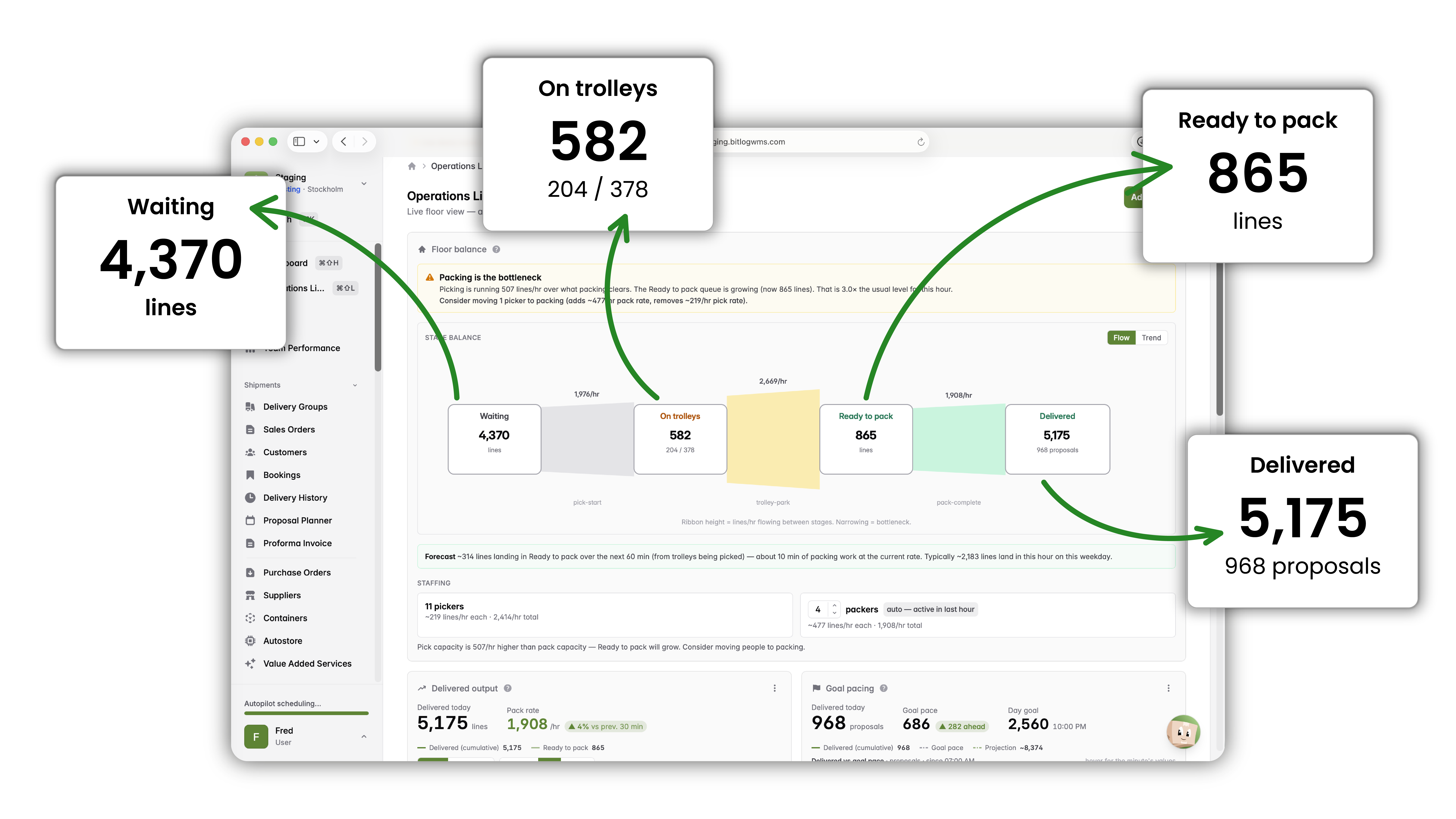
Autopilot is the warehouse planning software inside Bitlog WMS, and it's the planning engine that runs your floor. It keeps every open order in memory and recalculates the entire backlog every ~3 minutes, so a new order, a changed purchase order, or a shifted priority is absorbed into the plan automatically instead of missed.

This is continuous warehouse optimization: the plan is never a snapshot from this morning. It's rebuilt against reality, all day.
bitlog_wms-your_warehouse_on_autopilot-top_right_new

Here's what runs on every recalculation:

1

It reads your open orders, live inventory, incoming purchase orders, and every deadline.

2

It finds orders that can ship together.

3

It builds optimized picking batches and the shortest route through the warehouse.

4

It prioritizes the work against your own business rules and carrier cut-offs.

5

It pushes the updated pick lists straight to the mobile app.

Proposal Planner lives inside Autopilot, so the proposals your team works from are always the current best plan, not the one from the last batch.

A note on the engine, because technical buyers ask: Autopilot is deterministic optimization, not AI. It follows the rules you set and the math of your warehouse. It's the brain that runs the floor. The AI in Bitlog assists and coaches; your operations run on the proven optimization engine.

What warehouse planning software should handle automatically

Five decisions Autopilot takes off your desk, every few minutes, all day.

neurology

Dynamic prioritization

Autopilot tracks carrier cut-offs, express orders, and priority customers, and re-ranks the whole queue every ~3 minutes as orders arrive. Which means your team is always working on what ships next, and the afternoon cut-off rush stops being a rush.
extension

Batch picking and route optimization

It groups orders into trolley batches and calculates the shortest path through the warehouse. Which means up to 30% less walking distance per pick, and the same team moving more lines without moving faster.

rocket

Order consolidation

It merges orders going to the same address, holds backorders for the next scheduled delivery, and matches shipments to customers' fixed delivery days. Which means fewer parcels leaving the building and lower freight spend, without anyone tracking it by hand.

rocket

Smart stock reservation

It reserves against current stock and incoming purchase orders together, and re-optimizes those reservations every few minutes so buffer stock feeds the orders that ship first. Which means no overselling, and no manual juggling of who gets the afternoon delivery.

rocket

It keeps running when your ERP doesn't

Autopilot runs cloud-native on Microsoft Azure, independent of your ERP. Which means the floor keeps picking through ERP maintenance windows, and everything syncs back automatically when the ERP returns.

A day with Bitlog WMS Autopilot

1

7 AM: You arrive to a floor that's already moving

Autopilot processed the overnight orders and built the first optimized batches. You check the dashboard for a few minutes, then get on with the real work.

2

Every 3 min: New orders flow in.

Autopilot analyzes, batches, prioritizes, and updates the mobile app. No one waits for the next planning round.

3

10 AM: A customer changes their delivery address in the ERP.

Within a few minutes, Autopilot has re-evaluated the batch. The picker sees the update on their device.

4

12 PM: Carrier cut-offs are approaching.

Autopilot moved those orders up hours ago. You'll make the deadlines without the afternoon scramble.

5

2 PM: A purchase order lands at receiving.

Autopilot allocates the reserved quantities and builds pick lists for the items that just arrived.

6

5 PM: Tomorrow's picks are already planned.

You review the day, and you leave on time.

Automation, not autonomy. You stay in control.

Autopilot follows the rules you set. Priorities, consolidation logic, delivery days, and cut-offs are all yours to configure, and yours to change from the web portal without waiting on a consultant.

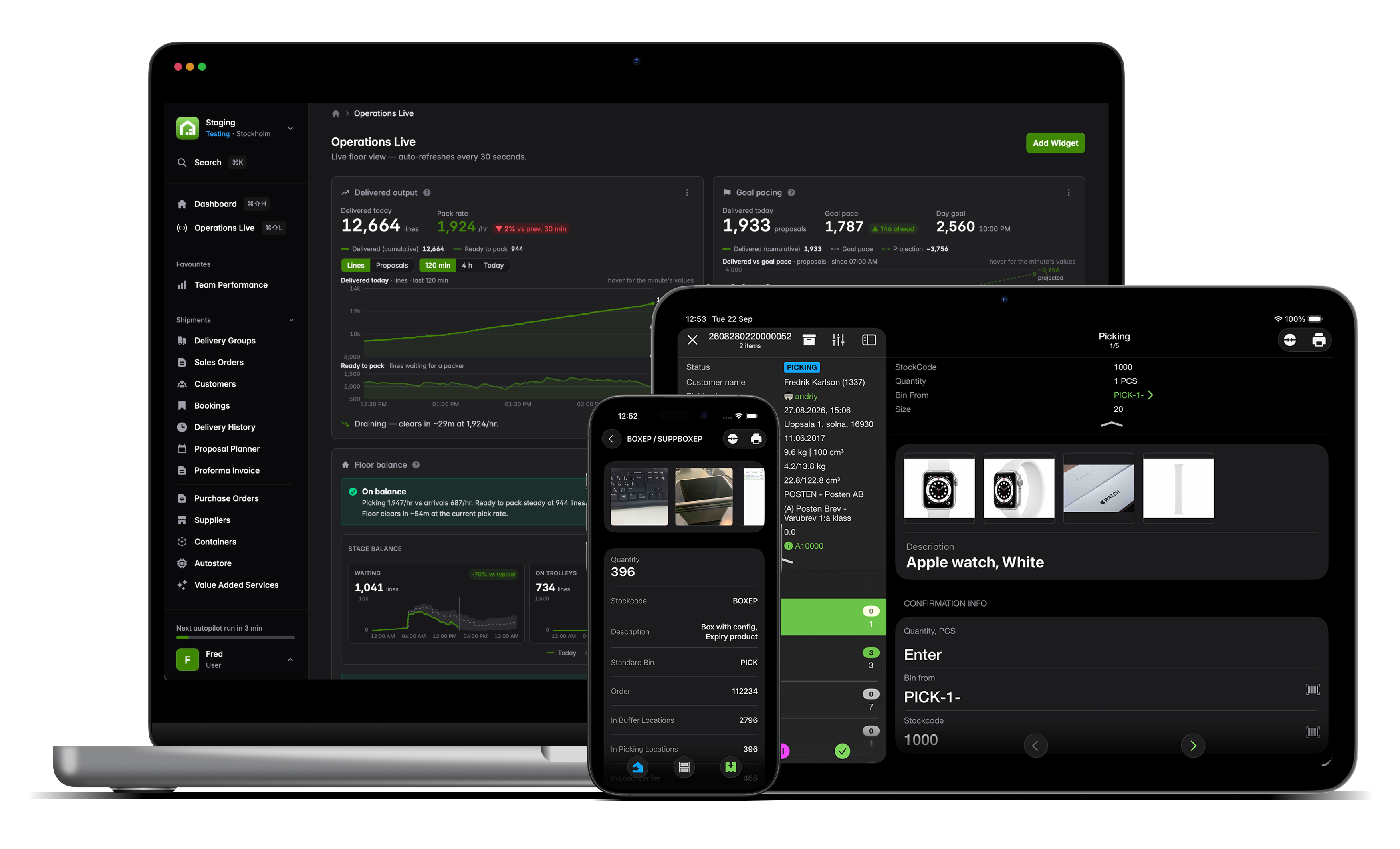
Override any single decision on the spot, from the portal or the mobile app. Adjust a rule, and the next recalculation runs under the new one. Autopilot handles the routine so your team can handle the exceptions, which is where their judgment actually earns its keep.
Bitlog_WMS_WEB_APP_upper right corner_plain_popping_boxes

Autopilot is the brain. Bitlog WMS is the rest.

Autopilot plans and steers, but it doesn't work alone. The same engine drives Picking Route Optimization, coordinates people and robots through Relay Picking and the AutoStore Connector, and surfaces the whole floor in real time inside the new web portal. One system, one plan, from a single vertical lift up to a full goods-to-person operation.
Mobile tablet laptop bitlog 11
FAQ

Common questions

Autopilot holds every carrier's cut-off time as a deadline and re-ranks your open orders against it every few minutes. Orders that have to ship today are prioritized automatically, so the work is sequenced to hit each cut-off instead of racing the clock in the afternoon.

From day one, Autopilot plans more efficiently than manual methods can. Most customers see measurable gains in the first weeks: less time spent planning, tighter consolidation, and faster picking on optimized routes. ROI lands in months, not years.

Complete control. Autopilot only ever acts on the rules you configure, you can override any decision instantly, and you can change the rules yourself in the web portal at any time.

Yes. Autopilot manages scarce-goods distribution, multi-site warehouses, layered priority rules, seasonal swings, and custom consolidation logic. It's configured to your operation during implementation, which is roughly 5 weeks of work spread across 5–12 weeks at your pace, alongside daily operations.

Autopilot runs inside Bitlog WMS, which has deep Business Central ecosystem fit and native integration with Visma.net and Visma Business, plus open APIs for everything else. Your ERP stays the system of record. Bitlog runs the warehouse.

Tell us what you're automating. We'll show you the perfect flow.

Book a 30-minute session and we'll map your setup onto Bitlog, live.