Put-away suggestions tell your receivers where each incoming item should go and how many units to put there. The warehouse management system (WMS) checks current stock, open orders and free space in your picking locations, then gives the operator a clear instruction the moment they scan an item. In Bitlog WMS, this is what Suggest Inbound does. The result is faster put-away, fewer misplaced items and an inbound flow that works the same way no matter who's on shift.
Why inbound decides how well you pick
Put-away mistakes are easy to miss. A box ends up in the wrong spot and nobody notices. Three days later, a picker walks to an empty picking location while the stock sits in buffer two aisles away.
Other mistakes cost time right away. An item that's already been ordered gets put on a shelf, only to be picked again an hour later.
Most warehouses rely on experience to avoid this. The receiver who's been there for eight years just knows where everything goes. That works fine until they go on vacation, or until you're growing faster than you can train new people.
What are put-away suggestions?
A put-away suggestion is an instruction from the WMS at the moment of receiving: put this many units here, and the rest there.
Each suggestion is based on two things:
- Rules you set, such as quality control requirements or how much a picking location should hold.
- What the system knows right now, including stock levels, open orders, free space in the picking location and any special handling needs.
The second part is what makes the difference. A fixed rule like "headphones go in aisle 4" doesn't know that aisle 4 is full, or that three customers ordered headphones this morning. A put-away suggestion does.
How does a WMS decide where goods go?
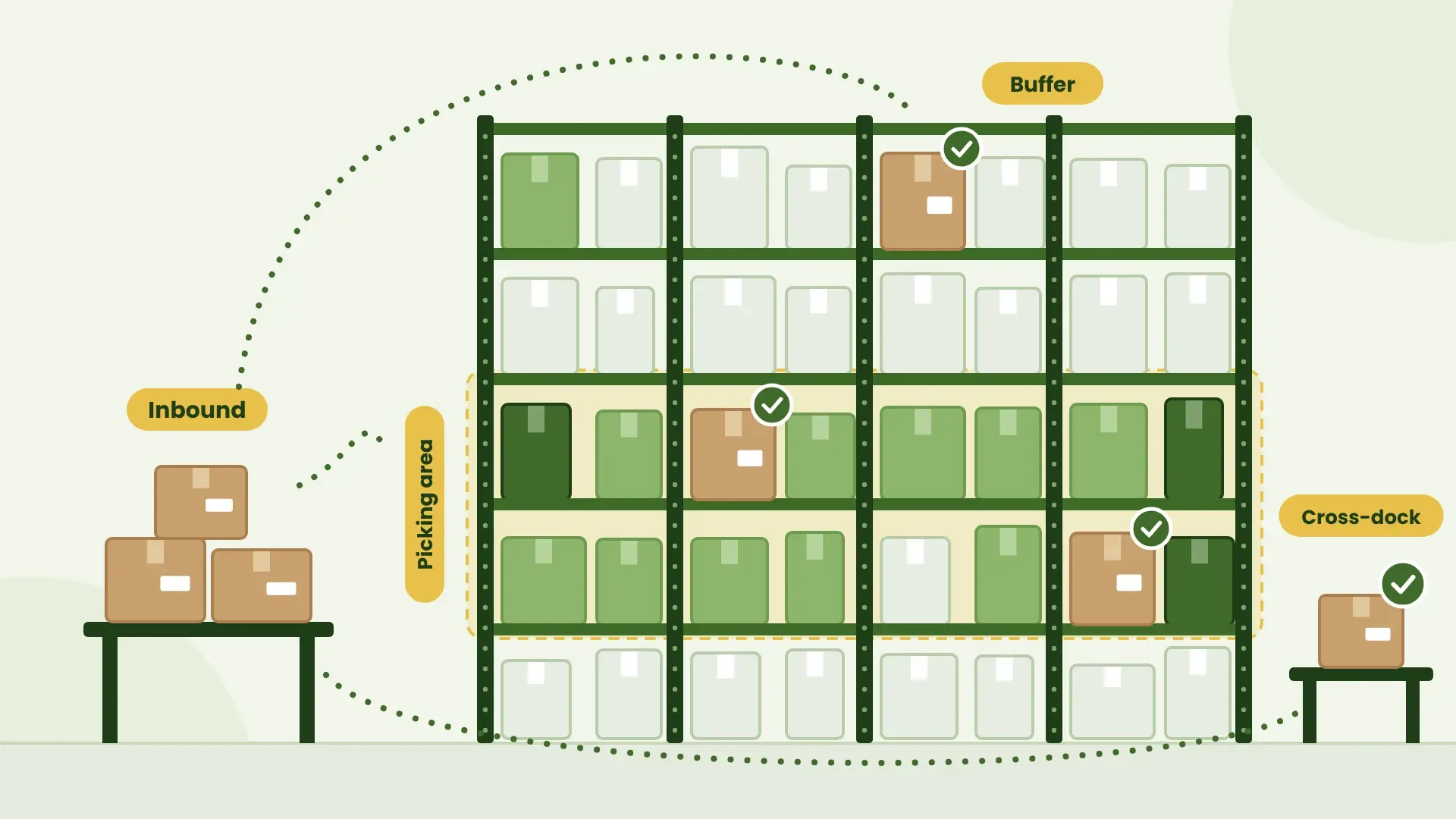
A good WMS checks every incoming item in a fixed order, so the most urgent destination always comes first. In Bitlog WMS, the order is quality control, measure check, cross-dock, priority area, already sold, picking area and, last, buffer.
In practice, that means:
- Inspection comes first. Rules per item send a set number, percentage or package count to quality control.
- Sold goods skip the shelf. Items already allocated to open orders go straight toward shipping.
- Picking locations get topped up. If a location is below its refill level, stock goes there before anything goes to buffer.
- Buffer gets the rest. Pallet and box quantities are calculated from each item's settings.
Example: 30 boxes of headphones
Here's how that works on a typical delivery. The example is made up, but the logic is the same as in Bitlog WMS.
Thirty boxes of headphones arrive at the dock. The receiver scans the first box, and the system runs through its checks:
| Check | What the system finds | Where the boxes go |
|---|---|---|
| Quality control | The item's rule says one box per delivery is inspected | 1 box to QC |
| Already sold | Some units are allocated to open orders | 4 boxes to shipping |
| Picking area | The picking location is below its refill level | 7 boxes to the picking location |
| Buffer | The rest, in pallet quantities from the item's settings | 18 boxes to buffer |
The receiver doesn't need to know any of this. They scan the item, confirm or adjust the quantity, scan the load carrier and move on.
What are the benefits of put-away suggestions?
- Less walking. Stock goes where it will be picked, so pickers stop hunting between picking locations and buffer, and picking routes get shorter.
- Fewer misplaced items. The system tells the operator where to go, so nobody has to guess.
- No detours for sold goods. Items already on an order go straight toward shipping.
- Earlier quality checks. Problems are caught at the dock, not after a customer complains.
- Faster onboarding. New receivers follow the same instructions as your most experienced people, which is a big part of what makes a WMS easy to learn.
How Suggest Inbound works in Bitlog WMS
Suggest Inbound is the Bitlog WMS module for put-away suggestions on inbound. It follows the logic described above.
The suggestion appears in the Bitlog mobile app as soon as the operator scans an item. They confirm or change the quantity, scan a load carrier and keep going. Operators can always override a suggestion.
A few features that make a difference day to day:
- Instructions per product category. Fragile, bulky and fast-moving goods can each have their own inbound instructions.
- Original quantity on purchase order lines. When several people receive the same line, everyone sees the originally ordered quantity next to the current one.
- Load carrier distribution. For automated storage like AutoStore, quantities are split across load carriers so each one is filled as much as possible.
Suggest Inbound isn't AI. It runs on Bitlog's rule-based optimization logic, so every suggestion follows rules you can see and change.
Inbound is often where a structured process pays off first. When workwear company Vårdväskan (Color4Care) moved receiving and put-away from paper to real-time scanning with Bitlog WMS, inbound processing got more than 30% faster. The inbound work went from one and a half full-time roles to less than one.
How to improve put-away without a WMS
You can get part of the way with a whiteboard and some discipline:
- Write down your put-away order. For example: QC first, then sold goods, then picking locations, then buffer. Make sure everyone follows it.
- Set a refill level for every picking location. Without one, nobody knows when a location actually needs more stock.
- Check open orders before putting goods away. A quick look at today's backorders saves a trip.
- Agree on a QC rule. For example, inspect one box per delivery from new suppliers.
- Label buffer locations by item, not just by aisle. It makes the next refill faster.
Once you have more rules than people can remember, it's usually time to let a system handle them.
FAQ about Suggest Inbound
Get inbound right and picking gets easier