

We know what your week looks like.
Before we talk about software, let's talk about your Thursday afternoon:
Two pickers called in sick and the rest are covering while orders pile up.
Someone picked the wrong SKU again and the customer is already emailing.
Your new seasonal staff need two days of training before they are useful.
Management wants a throughput report and you are still working off spreadsheets.
Your ERP says 40 units in stock. The shelves say otherwise.
None of this is your fault.
It is what happens when warehouse operations outgrow the tools running them
What changes when you run on Bitlog
Bitlog WMS is built specifically for warehouse operations, not adapted from an ERP module or bolted on top of something else. It is a real WMS, designed by people who understand warehouses.
Your team up and running in 15 minutes
The Bitlog mobile app is designed to be picked up fast. A 15-minute walkthrough is all a new hire needs to start picking orders correctly with no week-long training courses and no laminated instruction sheets.
Real-time inventory you can actually trust
Every pick, receipt, and movement updates stock in real time. What the system shows is what is on the shelf, so your team picks confidently and you stop chasing discrepancies between the WMS and reality.
Autopilot handles the picking logic
Bitlog's in-memory Autopilot continuously plans the most efficient pick paths, consolidates orders, and allocates work automatically. Your pickers walk less, pick more, and make fewer mistakes.
The performance data you need, when you need it
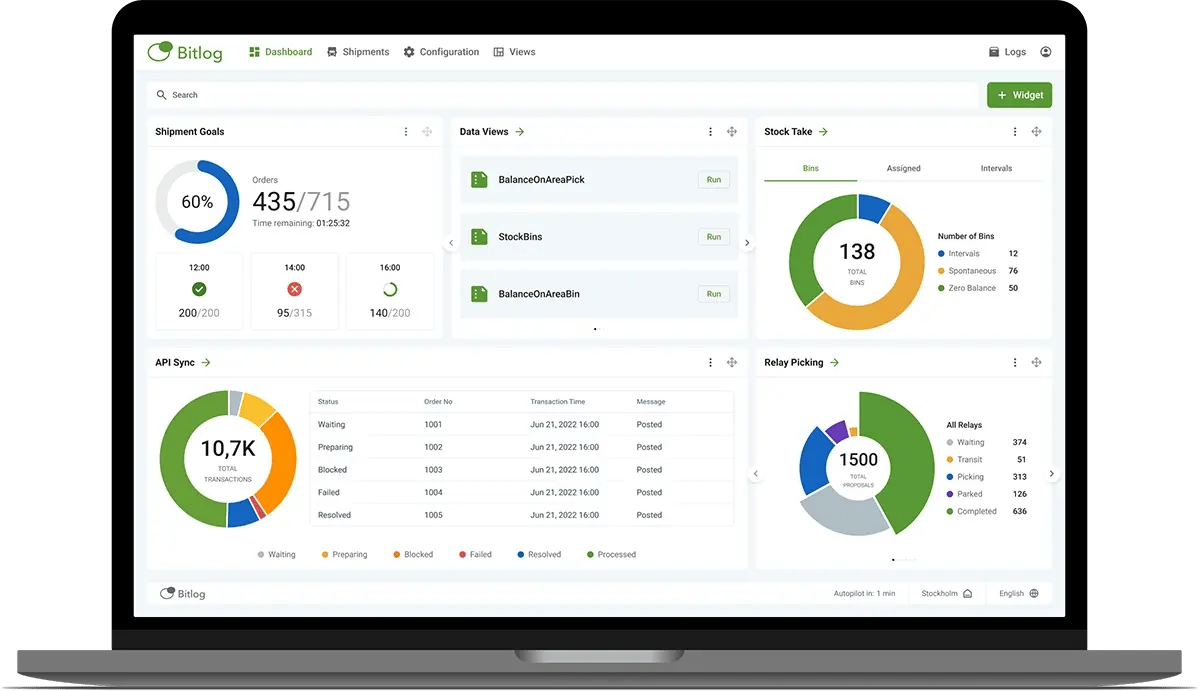
The Bitlog web portal gives you a live view of throughput, error rates, and team performance. When management asks for numbers, you have them. When something goes wrong, you see it before it becomes a problem.
Handles automation too, when you are ready
Already running Autostore or Kardex, or planning to? Bitlog connects to both and handles manual and automated picking in the same order. One system, one view, no duct tape.
Cloud-based and always up to date
Bitlog runs on Microsoft Azure with no servers to manage, no IT projects to run, and no scheduled maintenance windows. Updates happen automatically, so you always have the latest version and the 99,95% uptime guarantee means the system is there when you need it.
Tillgänglig för iOS och Android
Välj fritt, blanda om du vill, mellan de olika operativsystemen.

|

|
Apohem increased picking speed with .+240%. in four months

"Bitlog understands our business and we always develop new functionality together."
Therese Mella, Apohem

Apohem is not alone. Customers across e-commerce, retail, wholesale, and distribution use Bitlog WMS to run warehouses that their teams enjoy working in and that management can rely on.
FAQ – Common questions from warehouse managers
How long does implementation take?
A standard Business Central implementation takes 2 to 3 weeks. We have a proven project template, a pre-built connector, and certified partners who have done this many times. It is fast because Bitlog is true SaaS with no infrastructure to set up.
My team resists new systems.
Bitlog was built mobile-first. The apps feel modern and fast, not like an ERP screen squeezed onto a phone. Most warehouse teams adapt quickly because the system actually makes their job easier, not harder.
We already have warehouse features in our ERP.
Most ERPs handle purchasing and finance well. Warehouse execution covers real-time picking, route planning, error prevention, and automation support and that is a different problem entirely. Bitlog and your ERP work together: your ERP keeps doing what it does best while Bitlog handles the warehouse floor.
See Bitlog running in a real warehouse.
Book a 30-minute demo with one of our warehouse specialists. No sales script, no slide deck — just a live walkthrough of the features that matter most to you.
Getting your colleagues on board?
Most warehouse managers do not make this decision alone.
If you need to bring others into the conversation, here is what they will want to know.
For your CTO or CIO
Security, uptime, and how it connects to your systems
Your technical team will want to know about Microsoft Azure infrastructure, ISO certification, SLA, API access, and how Bitlog connects to your ERP and any automation. It is all here.
Read the technical overview →
For your CFO
The business case and payback time
Bitlog typically pays for itself within 2 to 4 months through picking efficiency gains and shipping cost savings. If your CFO wants numbers, this page has them, including a breakdown of where the savings come from.
Read the ROI breakdown →
For your CEO
What this means for the business
Dashboard?? Faster order fulfillment, fewer customer complaints, lower freight costs, and a warehouse that can scale without hiring proportionally. This page connects the operational gains to business outcomes..
Read the business case →